
Anime Club
Discover, watch, and learn Japanese through anime
Why Anime for Learning Japanese?
Anime, especially Slice of Life, provides native Japanese dialogue, cultural context, and visual cues that make language learning more engaging than traditional methods
Where to find anime?
HiAnime is a good place for watching anime, while Nyaa (Torrent) is the best place for downloading them
What tools should you use?
Choose the best tools for helping you with anime immersion and mining! Each has its own strengths and weaknesses, check them in the squares to the right~
ASBPlayer
MPV
ASB Player
1. Download ASBPlayer & Settings
Download the extension for your browser and, optionally, download a settings preset so you don't have to manually change anything at all~ here is a Youtube guide on it as well, just be aware of the notetype differences

3. How to Use
STEP 3Once all settings are set, all you need are subtitles and a video
Subtitles Sources
Video Options
You can also upload video files to ASB's own page
After having both, just drag the subtitles to the video and now you will be able to mine the sentences with automatic sentence audio and screenshot capture. Mine the word from the subtitle using Yomitan (+) button and
use a shortcut for updating the last created Anki card, in this case, Ctrl-Z or the hotkey you have chosen
2. Setting ASBPlayer
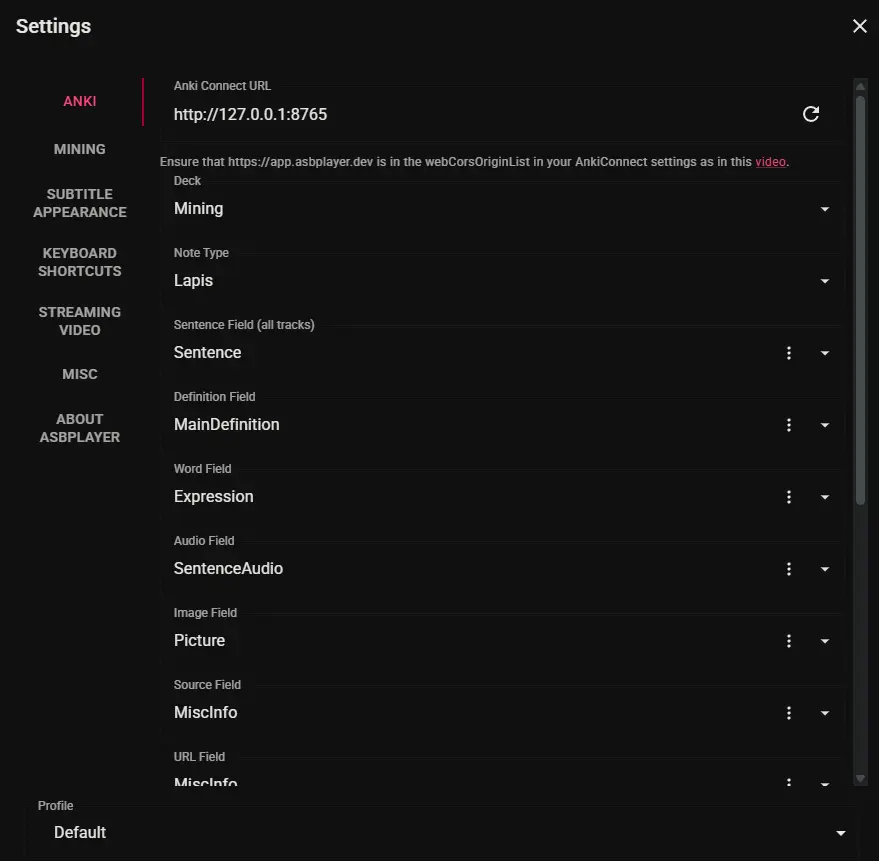
STEP 2Click on the extension, then click on " open App" and then click on the gear icon to configure ASBPlayer.
Cycle between ASB's settings images and import or change the settings to the optimal ones
MPV Player
1. Download MPV & Settings
Download MPV player for your system and, optionally, download a settings preset so you don't have to manually change anything at all~ here is a Youtube guide on it as well, just be aware of the notetype differences

3. How to Use
STEP 3Once all settings are set, all you need are subtitles and a video
Subtitles Sources
Video Options
Drag and drop the video and subtitles to the MPV Player and select a tool below:
2. Setting MPV
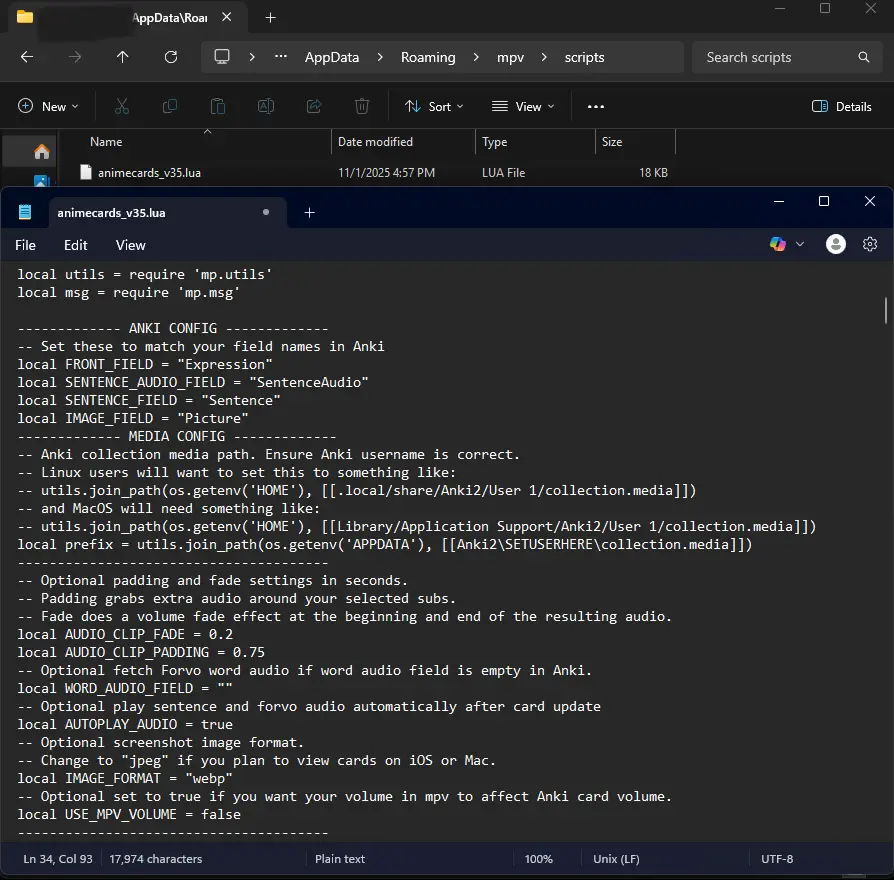
STEP 2After installing mpv, press "Win + R" → type "%Appdata%" → Go into the MPV folder → create a "scripts" folder if there isn't one yet → paste "animecards_v35.lua"
Tips
Helpful tips
Autonext Script
A script that auto skips to the next anime episode in your anime's episodes folder, you can download it from here. To add it to MPV, press "Win + R" → type "%Appdata%" → Go into the MPV folder → create a "scripts" folder if there isn't one yet → paste "autonext.lua" in there
Tracking & Logging
Keeping track of how many episodes and anime you have watched is a nice way to see how much of a hard work you have put it. Seeing the numbers go up is a good source of motivation. I recommend Anilist for tracking anime, toggl tracker for tracking time and Misuzu for tracking characters!
JP Subtitles or Without Subtitles
"Both are very good in their own way. Watching anime with subs is perfect for when you want to improve your understanding in general. Watching anime without subs is good for improving your general listening. My recommendation here is to try and find a balance. Don't only watch one or the other way but instead make it dependent on what are you want to improve in" - Sakuusaku
Setting yourself goals every day and making it a habit
This is very important and will allow you to read more and consistently every day. Setting an amount of hours per day or an ammount of characters and setting it as a priority in your day is a very good way of reading constantly and slowly turn reading into a habit. I extremely recommend it and you can also use pomodoro timers to help you stay focused. Ex.: (50min of reading and 10min of break)